
Download Watcher1 – website monitoring tool, offline alert, email notifications
Overview
In the fast‑moving world of online business, a single moment of downtime can translate into lost revenue, damaged reputation, and frustrated users. Watcher1 is a lightweight, no‑install utility designed to give you peace of mind by constantly checking the health of any web page you specify. Whether you need to monitor a corporate site, a personal blog, or a custom web‑app endpoint, Watcher1 lets you set a time interval, choose the type of check (simple HTTP response, page size, or specific text), and receive immediate email alerts when something goes wrong.
Because the program runs directly from an executable file, there’s no complex setup—just download, configure, and start monitoring. The built‑in log captures every event, allowing you to diagnose the exact cause of an outage and act quickly. For anyone who depends on an online presence, Watcher1 offers a secure, reliable, and free way to stay informed about site availability.
Key Features of Watcher1
- Real‑time page monitoring – Check any URL at customizable intervals (seconds to hours).
- Multiple check types – Verify HTTP status, exact page size in bytes, or the presence of specific text strings.
- Instant email alerts – Configure two separate email addresses to receive warning messages, each containing a direct link to the detailed log.
- No‑install executable – Run Watcher1 directly from the EXE file, ideal for portable use on any Windows machine.
- Comprehensive logging – Every check is recorded; you can view, save, or delete log entries for later analysis.
- Customizable timeout and retry settings – Prevent false positives by adjusting how long the program waits for a response before flagging a problem.
- Lightweight footprint – Uses minimal system resources, making it suitable for servers, desktops, or low‑powered PCs.
- Secure email transmission – Supports SSL/TLS for email notifications, ensuring that alerts are sent safely.
These features combine to create a robust monitoring solution that is both simple enough for beginners and powerful enough for seasoned web administrators. The ability to search for custom text is particularly useful when you need to verify that dynamic content—such as a generated token, a specific API response, or a status message—appears correctly on the page. Moreover, the dual‑email option means you can keep both a technical team and a business stakeholder in the loop, reducing the time it takes to react to an outage. Because Watcher1 is free and does not require a license key, you can deploy it across multiple machines without worrying about additional costs.
Installation & Usage Instructions
Setting up Watcher1 is intentionally straightforward. Follow these steps to get your monitoring up and running in under five minutes:
- Download the executable: Visit the official website or trusted software repository and click the “Download Watcher1” button. The file is a single
.exesized under 2 MB. - Run the program: Double‑click the downloaded file. Because it is a portable app, Windows will prompt you to confirm you want to run it; click “Yes”.
- Configure monitoring parameters:
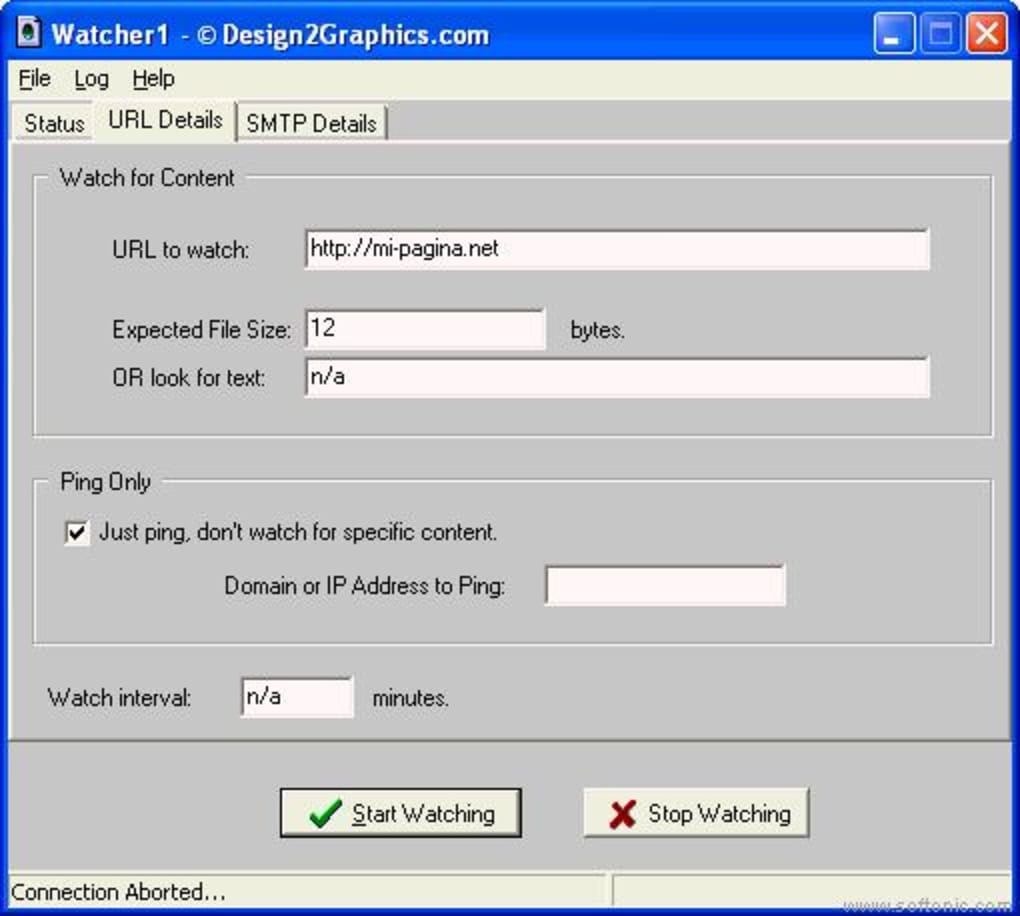
- Enter the URL you wish to monitor in the “Target URL” field.
- Select the check type – “HTTP status”, “Page size”, or “Text match”.
- If you choose “Page size”, specify the expected byte size (e.g., 12000 bytes).
- If you choose “Text match”, type the exact string that must appear on the page.
- Set the interval between checks (e.g., every 60 seconds).
- Set up email notifications:
- Enter the SMTP server details (host, port, username, password).
- Choose two email addresses that will receive alerts.
- Enable SSL/TLS if your email provider requires it.
- Start monitoring: Click the “Start” button. Watcher1 will immediately begin its first check and then continue according to the interval you defined.
- Review logs: Whenever an alert is triggered, the email you receive contains a link to the program’s log window. Open it to see timestamps, response codes, and any custom messages.
- Save or delete entries: Use the “Save” button to export logs to a text file for archiving, or click “Delete” to clear entries you no longer need.
Because the tool runs as a standalone executable, there is no registry modification, no background services to install, and no uninstall process required. If you ever need to stop monitoring, simply close the application window. For users who prefer a more persistent solution, you can place a shortcut in the Windows “Startup” folder, ensuring Watcher1 launches automatically after each reboot.
Compatibility, Pros & Cons
Watcher1 is built for the Windows operating system and has been tested on Windows 10, Windows 11, and Windows Server 2016/2019. The executable runs under both 32‑bit and 64‑bit environments, making it suitable for legacy machines as well as modern servers. While the current version does not have native macOS, Linux, Android, or iOS builds, you can still run it on those platforms using compatibility layers such as Wine or a virtual machine, though performance may vary.
Pros
- Free and completely portable – no installation required.
- Customizable monitoring (status, size, text) covers most use‑cases.
- Instant email alerts with secure TLS support.
- Lightweight, low CPU and memory usage.
- Detailed logging for post‑mortem analysis.
- Dual‑email notification keeps both technical and non‑technical stakeholders informed.
- Simple UI makes setup quick for users of any skill level.
Cons
- Only native Windows support; no dedicated macOS, Linux, Android, or iOS apps.
- Limited to HTTP protocol; HTTPS monitoring works only if the SMTP server supports TLS.
- No built‑in dashboard or web‑based interface – monitoring is confined to the local executable.
- Advanced alerting (SMS, push notifications) requires third‑party integrations.
- Lacks a scheduling calendar; interval settings are fixed numeric values.
FAQ – Frequently Asked Questions
Can Watcher1 monitor HTTPS sites?
Yes. While the core check works over HTTP, Watcher1 can also request HTTPS URLs. Ensure that the target server’s SSL certificate is valid; otherwise the check may fail and trigger an alert.
Is there a limit to the number of URLs I can monitor?
Watcher1 monitors one URL per instance. If you need to watch multiple sites, simply run additional copies of the executable with different configurations.
Do I need an internet connection to receive email alerts?
Yes. The program must be able to reach both the target website and the SMTP server you configured. If the machine loses internet connectivity, alerts will be queued until the connection is restored.
Can I customize the content of the alert email?
Watcher1 includes a basic email template that provides the URL, time of failure, and a link to the log. Advanced customization (HTML formatting, additional fields) is not supported in the free version.
Is there a way to export the log data?
Yes. The log window includes a “Save” button that lets you export the entire log to a plain‑text (.txt) file for archival or further analysis.
Conclusion & Call to Action
For anyone responsible for an online presence, staying ahead of downtime is non‑negotiable. Watcher1 delivers a no‑cost, no‑install solution that monitors a single webpage with configurable checks and immediate email notifications. Its lightweight design ensures it won’t hog system resources, and the built‑in log provides the forensic detail you need after an incident. While power users may eventually outgrow its single‑URL limitation, for small businesses, personal blogs, and developers testing a single endpoint, Watcher1 is a perfect fit.
Ready to safeguard your site? Download Watcher1 now, set your first check, and enjoy the peace of mind that comes with real‑time monitoring. Remember, the sooner you detect an outage, the faster you can remediate—protect your visitors, your brand, and your bottom line with this simple yet powerful utility.







